

In an era where tech giants are racing to embed artificial intelligence into every corner of the browsing experience, Mozilla is taking a different—and distinctly open-source—approach. With the release of Firefox 148, users finally have access to a long-promised “AI Kill Switch,” giving them total control over whether generative AI touches their data.
For the community at OSSMalta, this update is a significant win for user agency and digital sovereignty. Here is a breakdown of what’s new and why this update matters for privacy-conscious users.
The Global AI Kill Switch: One Click to Opt-Out
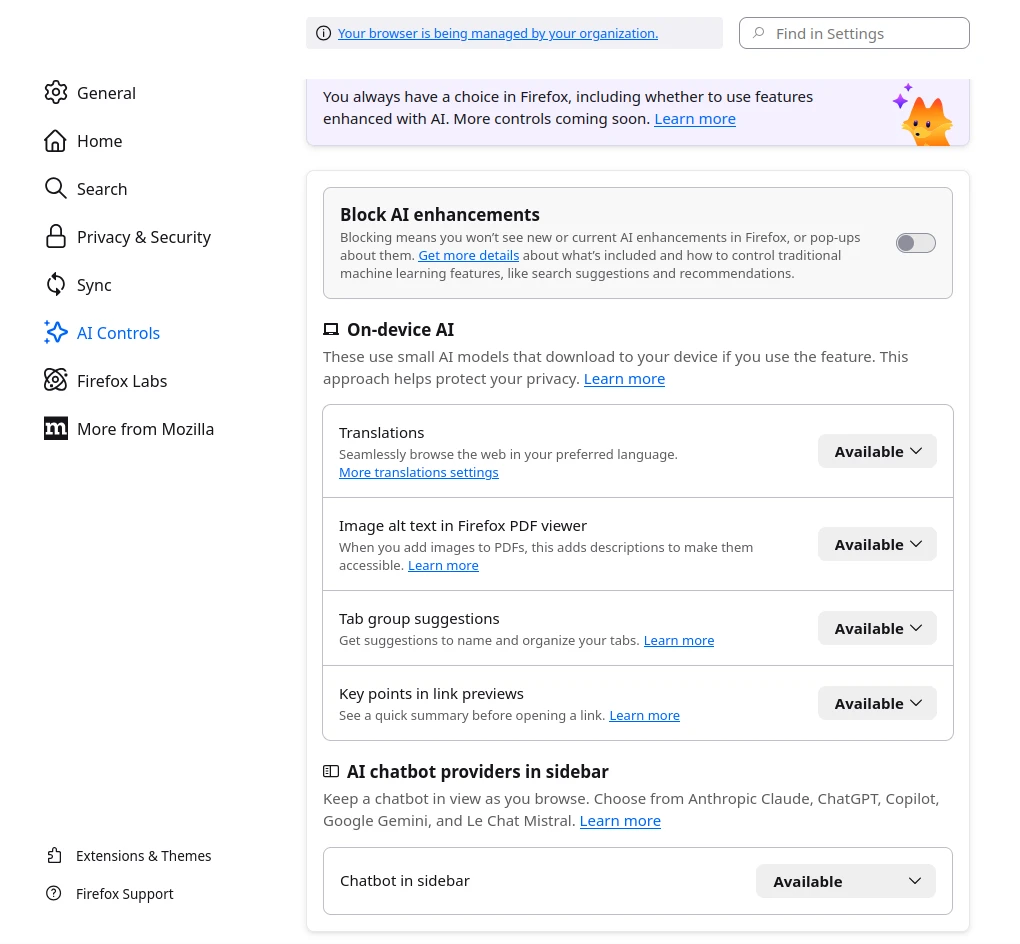
The headline feature of Firefox 148 is the new AI Controls section in the settings menu. While Mozilla has been experimenting with local AI features for months, they faced significant community backlash regarding “AI bloat.”
In response, Mozilla introduced a global toggle: “Block AI Enhancements.” What it does: With a single click, it disables all current generative AI features.
- Future-Proofing: Crucially, this switch also blocks future AI features from being enabled automatically during browser updates, sparing users from the “whack-a-mole” game of disabling new tools as they appear.
Granular Control: Local AI vs. Cloud AI
Mozilla understands that not all AI is created equal. Firefox 148 allows for a hybrid approach where you can pick and choose which features to keep active.
- Local-First Translations: Unlike many competitors that send your traffic to the cloud for translation, Firefox uses local Large Language Models (LLMs). This means your data never leaves your device—a core tenet of the open-source philosophy.
- PDF Accessibility: The browser can now use AI to generate automatic alt-text for images in PDFs, making documents more accessible for visually impaired users.
- AI-Enhanced Tab Grouping: For those with “tab fatigue,” Firefox can suggest logical groups and names for your open windows.
- Optional Chatbot Sidebar: For users who want AI, the sidebar supports integration with external models like ChatGPT, Claude, and Gemini. However, this remains strictly opt-in.
Beyond AI: 50+ Security Patches
While the AI switch is making headlines, Firefox 148 is also a critical security release. The update addresses over 50 vulnerabilities, several of which were classified as “High Risk.”
Key security improvements include:
- Sandbox Escapes: Fixes for flaws that could allow malicious code to break out of the browser’s isolated environment.
- Use-After-Free Vulnerabilities: Hardening of the JavaScript components to prevent memory-related exploits.
- The Sanitizer API: Firefox 148 is the first to ship the standardized
setHTML()method, a safer alternative toinnerHTMLdesigned to mitigate Cross-Site Scripting (XSS) attacks.
Why This Matters for OSSMalta
The Linux and Open Source communities are often divided on AI. Some see it as a productivity revolution; others see it as a privacy nightmare. TUXEDO Computers and other open-source advocates have highlighted that while Firefox 148 keeps the code for these features in the engine, the ability to completely remove downloaded models and silence AI prompts is a step in the right direction.
If you are looking for a browser that respects your choice and doesn’t force “AI slop” into your workflow, Firefox 148 is a mandatory upgrade.
How to Disable AI in Firefox 148:
- Open the Hamburger Menu (three lines) and select Settings.
- Navigate to the new AI Controls tab in the left sidebar.
- Toggle “Block AI Enhancements” to ON.