


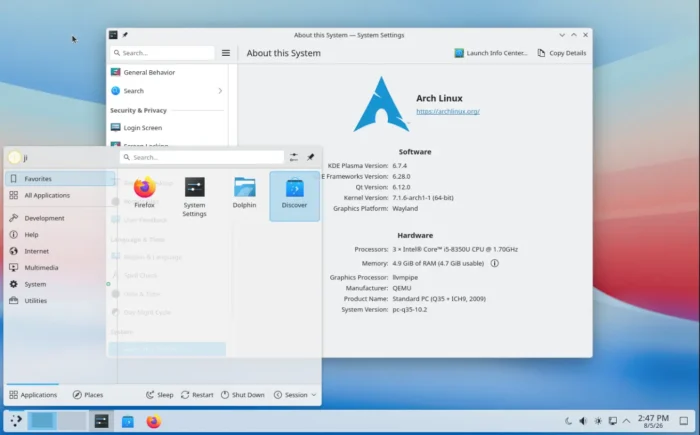
KDE Plasma, the popular Linux desktop environment, released new 6.7.4 bug-fix and stability release yesterday.
The new desktop version introduced multi-GPU and display handling improvements, better input, accessibility, and UI consistency, and various fixes across the desktop, KWin, and other components.
For computer with multiple GPUs, it now keeps the GPU without any display output connected in the GPU list, rather than just remove it. This is useful for some applications such as a video editor for offload rendering.
It also added new KWIN_RENDER_NODES environment variable, allowing user or system administrator to select which GPU KWin should use for rendering the desktop, panel, window animations, and workspace effects.
The release also improved display and monitor handling. It fixed the window visibility issue when locking the screen, turn monitors off, or waking up. And, now KWin updates correctly when monitor turns on/off when idle or wake up from sleep.
It fixed several desktop and panel issues, include dragging items onto grouped task manager entries, emoji picker keyboard focus issue, and game controller settings crashes.
And, it improved notification job model icon handling, cursor theme UI sizing, as well fixed invalid geometry crashes, digital clock layout issues, and screen power inhibition problems.
The KDE Input and UI framework has been updated with focus outline shows which control is currently selected, smooth scrolling support, and more KDE components respect the global animation speed.
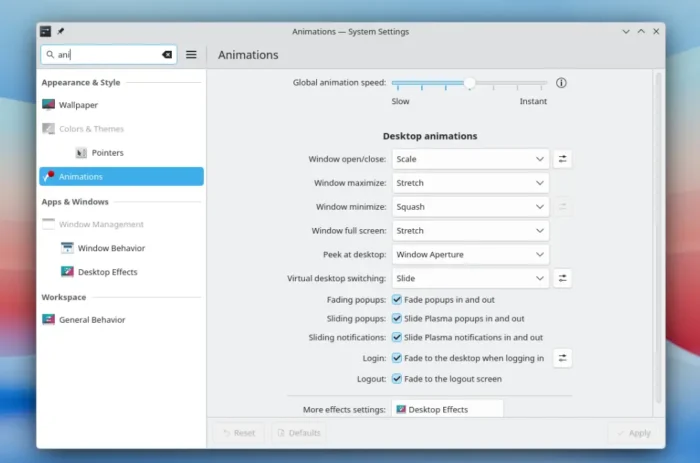
more KDE components now respect the global animation speed
The XDG desktop portal that provides a safe way for sandboxed apps (e.g., Flatpak) to request system level permissions has been updated with screencast v5 support for better screen selection and monitor handling, improved remote desktop and virtual input support, and fix for global shortcut registration during session startup.
Other changes include:
- Better GPU reset to avoid black screens, frozen desktop or compositor restart.
- QR code scanning when editing existing images in the screenshot tool.
- Enter key now activates configuration buttons in OSD.
For more about this Plasma desktop release, see the official changelogs.
How to Get Plasma 6.7.4
As you see via the screenshots above, Arch Linux has already included the new Plasma desktop release in system repository. And, Ubuntu and Fedora will also include this desktop release in the next Ubuntu 26.10 and Fedora 45.
Other Linux distributions may view this page for the plasma desktop package version state. And, you may try out the KDE-developed KDE Linux distribution for the latest KDE software.