


October 14th was Ada Lovelace Day! (ALD), an annual international event on the second Tuesday of October that celebrates the achievements of women in science, technology, engineering, and mathematics (STEM) fields.
Named after Ada Lovelace, the British mathematician is recognized as the first computer programmer. The day was started in 2009 to raise awareness and promote women’s significant contributions to STEM, which have historically been underrepresented.
Ada Lovelace, born on December 10, 1815, in Piccadilly Terrace, Middlesex (now part of London), England, and passing away on November 27, 1852, in Marylebone, London. Ada was an English mathematician and associate of Charles Babbage. She is best known for her work on Babbage’s Analytical Engine, a prototype of the modern digital computer, for which she wrote a program, thus earning her the title of the first computer programmer.
Lovelace was the daughter of the famous poet Lord Byron and Annabella Milbanke Byron, who separated two months after her birth. Her father left Britain, never to return, and Lovelace grew up without knowing him personally. She was privately educated by tutors and later pursued self-study. Her advanced mathematical studies were facilitated by the guidance of Augustus De Morgan, the first professor of mathematics at the University of London. On July 8, 1835, Lovelace married William King, who became the 8th Baron King. Upon his elevation to an earl in 1838, Lovelace became Countess of Lovelace.
Lovelace’s fascination with Babbage’s machines began in 1833 when she was introduced to him by their mutual friend, author Mary Somerville. In 1843. Charles Babbage had already began work on the Analytical Engine, envisioning a revolutionary calculating machine capable of modifying its computations mid-operation. This “tail-eating” capability allowed the machine to pause, use intermediate results, and determine the next steps dynamically. Babbage outlined the foundational operations necessary for such a machine, which, with adequate memory, could perform all conceivable calculations of his time. Remarkably, these operations align with those required by modern computers, making the Analytical Engine a precursor to the general-purpose computer—a concept formalized by Alan Turing in the 1930s.
Although the Analytical Engine was never constructed, Babbage meticulously documented its design, including the use of punched cards for programming, akin to those in Joseph Marie Jacquard’s weaving looms. These cards would define programs and provide initial values for computations, with mechanisms enabling loops via repeated card sequences. The Engine’s design incorporated a “Mill” (its central processing unit) standing 15 feet tall, and a “Store” (its memory) capable of holding 100 numbers, each up to 50 digits long. Additional features included a printer, card punch, and graph plotter. Babbage estimated the machine could multiply two 20-digit numbers in three minutes, requiring steam power to operate due to its scale.
Disappointed by the lack of domestic support, Babbage sought international backing. In 1840, he presented his ideas in Turin, Italy, inspiring Luigi Menabrea, who published an account of the Engine in 1842. Ada Lovelace, deeply interested in Babbage’s work, was later asked to translate Menabrea’s article into English. With Babbage’s encouragement, she expanded it significantly, adding detailed appendices. Published in 1843 under her initials, A.A.L., the paper became famous for “Note G,” where Lovelace illustrated the computation of Bernoulli numbers—a recursive sequence ideal for demonstrating the Engine’s capabilities.
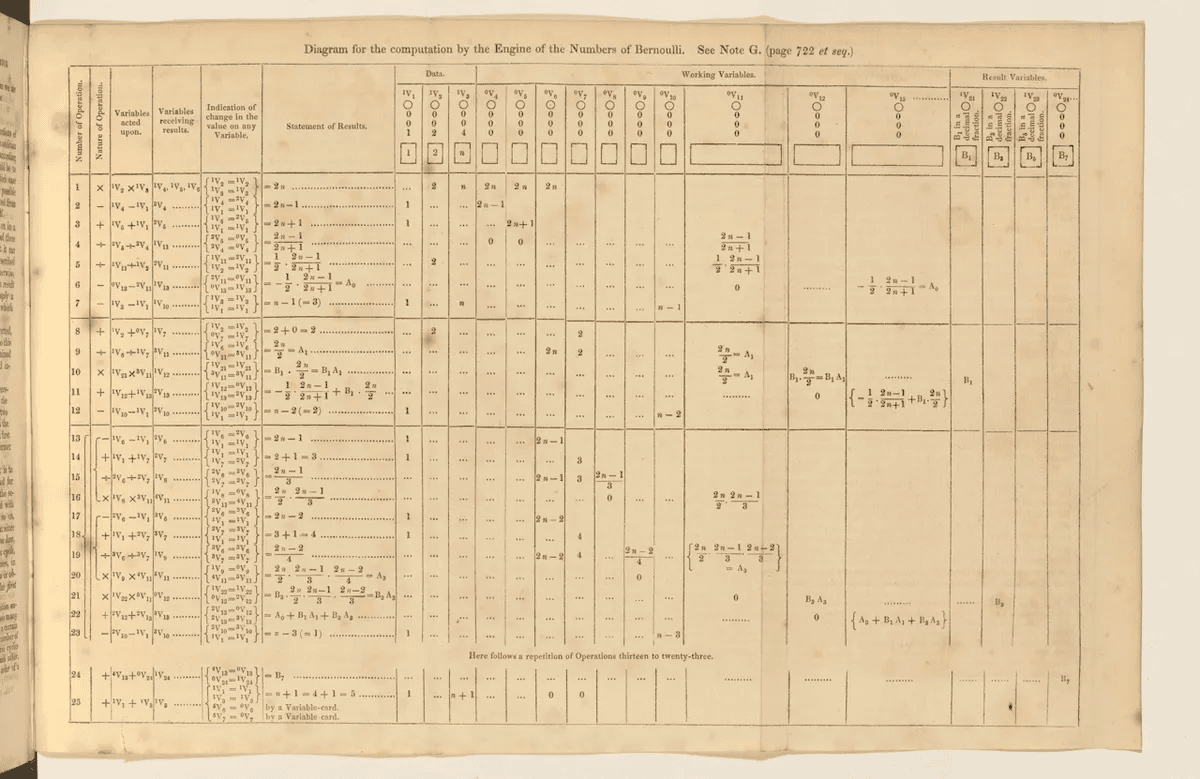
In “Note G,” Lovelace provided a comprehensive explanation of how the Engine’s components—Store, Mill, and cards—worked together during computation. Her detailed table, mapping data and operations, is often considered the first computer program. However, Lovelace herself described it as an “execution trace,” showcasing the Engine’s process rather than the actual program, which would have been encoded on the cards. This approach to explaining computation remains influential, echoed in 20th-century diagrams like those for the Manchester Baby, the first stored-program computer.
Lovelace’s insights extended beyond the technical. She noted the Engine’s ability to manipulate symbols beyond numbers, suggesting it could compose music or discover new mathematical laws. While she acknowledged the machine’s limitations in generating original ideas, her vision hinted at concepts akin to artificial intelligence. Alan Turing later challenged her assertion, arguing that machines could exhibit originality through unpredictable programming.
Lovelace’s paper reflects her profound understanding of programming’s complexity and her foresight about reducing computational inefficiency. Her meticulous work spans algebra, logic, and engineering, presenting principles that remain relevant nearly 200 years later.
The collaboration between Lovelace and Babbage was not without tension. Their correspondence revealed frustrations over lost drafts and diverging priorities. Despite these challenges, Babbage admired Lovelace’s intellect, referring to her as:
“that Enchantress who has thrown her magical spell around the most abstract of Sciences and has grasped it with a force which few masculine intellects (in our own country at least) could have exerted over it.”
Ada Lovelace’s contributions laid the groundwork for modern computing, blending rigorous analysis with visionary creativity. Her legacy continues to inspire and resonate in the fields of mathematics, computing, and beyond.
Although only a small part of Babbage’s Analytical Engine was ever built, Lovelace’s contributions have had a lasting impact. The programming language Ada is named in her honor, and the second Tuesday in October is recognized as Ada Lovelace Day, celebrating the achievements of women in science, technology, engineering, and mathematics (STEM).
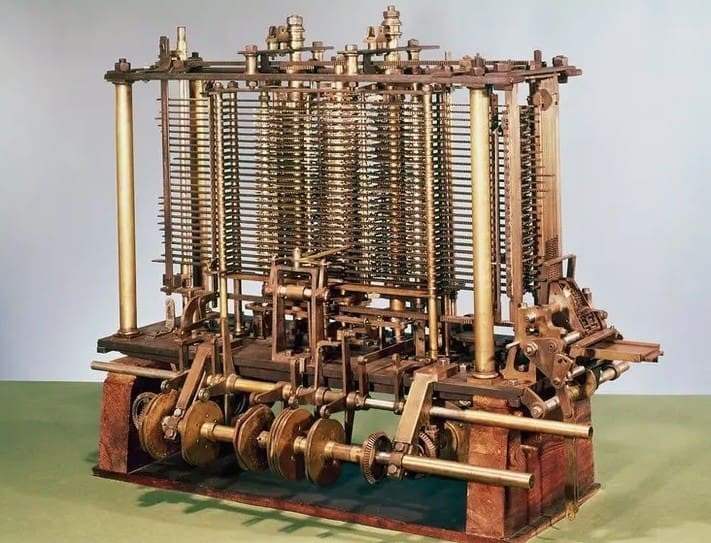
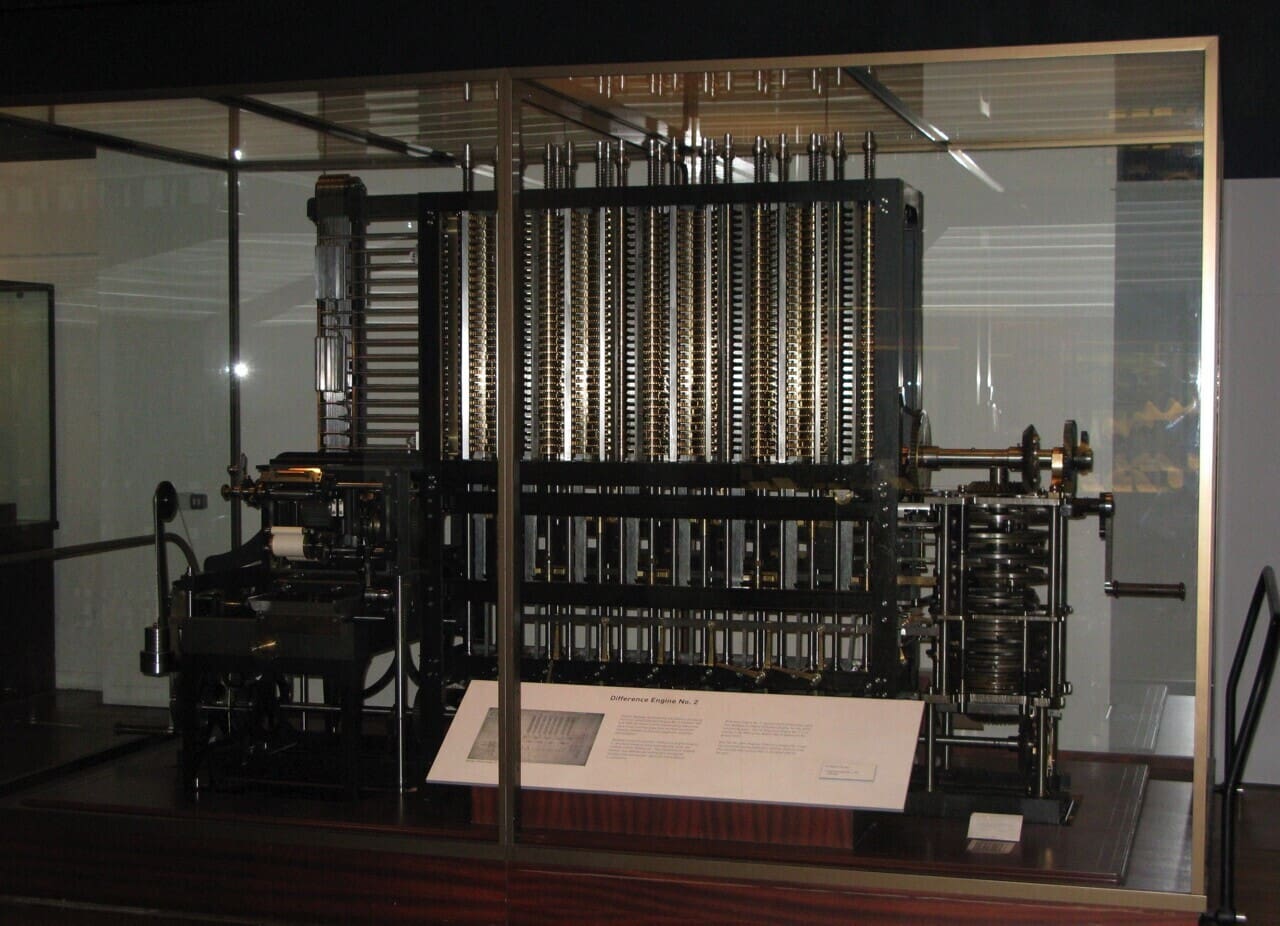
The Analytical Engine itself, designed as a general-purpose, fully programmable, automatic mechanical digital computer, was intended to perform any calculation. It featured four key components: the mill (analogous to a modern CPU), the store (acting as memory and data storage), the reader (input via punched cards), and the printer (output). Although never fully constructed, the Analytical Engine was revolutionary for its time due to its programmability and ability to execute complex sequences, such as conditional branching—an essential feature of modern computers.
Despite Babbage’s failure to secure sufficient funding to complete the Analytical Engine, his vision laid the groundwork for the development of computers as we know them today. Ada Lovelace’s work on this machine marked a pivotal moment in the history of computing.
Want to try Ada?
Since Ada is similar in some ways to Algol or Pascal. It was originally designed for program reliability, easy maintenance, and efficiency. Most importantly, however, Ada’s creators recognized that coding is a human activity, so a programming language must be something that humans can easily read and interact with.
For Ada, readability is more important than conciseness. Writing code in Ada produces highly readable code, even compared to Python, and although its usage tends to be specialized, Ada is still being developed today.
Installing Ada
The toolchain for Ada is the GNU Ada Development Environment, better known as GNAT.
You can install GNAT on Linux using your distribution’s package manager. On Fedora, CentOS, or similar:
$ sudo dnf install gcc-gnatOn Debian, Linux Mint, and derivatives:
$ sudo apt install gnat
On macOS and Windows, you can download an installer from the Adacore website (choose your platform from the drop-down menu).
Program units
Ada code is made up of program units. There are many different types of program units, but the ones you spend the most time with when coding are subprograms. A subprogram is an algorithm. In Ada, a subprogram can be a procedure or a function. A procedure has no return value, while a function does.
How to write a procedure in Ada
Create a file in a text editor and enter this simple Ada code:
with Ada.Text_IO; use Ada.Text_IO;

procedure hello is
begin
  Put_Line ("Happy Ada Lovelace day.");
end hello;
Save the file as hello.adb.
The first line uses the keyword with, which is similar to the import or include statement in other languages. This enables the program to use the test_io Ada library.
The next line defines a procedure, which is a nicely intuitive Ada term for a self-contained algorithm. A procedure is named and then delimited by the keywords begin and end.
To run this example program, run gnatmake.
$ gnatmake hello.adb
gcc -c hello.adb
gnatbind -x hello.ali
gnatlink hello.ali
The executable application is placed into your current directory, bearing the name of the procedure. Run it to see the result.
$ ./hello
Happy Ada Lovelace day.
Variables
Ada is a strongly typed language, which means that when you create a variable, you must declare what kind of data it can contain. You must declare a variable before you can use it.
with ada.Text_IO;
use Ada.Text_IO;

procedure Main is
  myString: String := "Hello world";
begin
  Put_Line ( myString );
end Main;
If you don’t know the contents of a variable when you declare it, you can declare it and set its contents later.
procedure Main is
  myNumber: Integer;
begin
  myNumber := 123;
end Main;
If you’re used to dynamically typed languages, such as Python, that try to adapt the way it treats data based on what data it finds in a variable, then a strongly typed language like Ada can have some frustrating surprises for you.
For instance, trying to print an integer with Put_Line fails because Put_Line expects a string. When you have data of one type that you want to treat as a different type, you must perform type conversion. In Ada, conversion from one type to a string type is done with the 'Image attribute.
with ada.Text_IO;
use Ada.Text_IO;

procedure Main is
  myNumber: Integer;
begin
  myNumber := 123;
  Put_Line ( Integer'Image (myNumber) );
end Main;
There are several different kinds of conversions available, and what you use depends on what kind of data you need for a given task.
Loops
All the usual flow control mechanisms are present in Ada. There are if/else statements, case statements, while loops, for loops, and so on.
The while loop is similar to a while loop in other languages, and it can be controlled using the same tricks. For instance, it is common to create a variable set to 0, increment that variable once per iteration of the loop, then run the loop only while that variable is less than a specific value.
with ada.Text_IO; use Ada.Text_IO;

procedure Main is
   myString: String := "Hello";
   myCount: Integer := 0;

begin
-- while loop
   while myCount < 3 loop
      Put_Line ( myString );
      myCount := myCount + 1;
   end loop;
end Main;
This outputs:
$ ./main
Hello
Hello
Hello
A for-loop uses a temporary variable (I in this example) to store data from an array or range the loop iterates over. There’s no need to increment because that’s implicit with a for loop.
with ada.Text_IO;
use Ada.Text_IO;

procedure Main is
begin
  for I in 0 .. 3 loop
    Put_Line (Integer'Image (I));
  end loop;
end Main;
This outputs:
$ ./main
0
1
2
3
How to write a function in Ada
Ada is designed with modularity in mind, so it’s easy to write small code fragments and then string them together into a larger application. A function consists of a declaration and a definition.
Open a file in your favorite text editor and add this declaration:
function Double_Integer (I : Integer) return Integer is
You’ve declared a function by giving it a name (Double_Integer), by specifying an argument (an integer called I), and by listing its return type (an integer). Now you must define what the function does. A function definition is a subprogram, just like a procedure, except that it returns a value.
Add this simple code to the file:
begin
    return I + I;
end Double_Integer;
Save this file as double_integer.adb.
To use your function, you must include it in your application using the with keyword. Open a new file called main.adb, and include your custom function.
with ada.Text_IO;
use Ada.Text_IO;
with Double_Integer;
In Ada, a function cannot be called as a stand-alone statement. You call a function by assigning its output to a variable.
In this block of code, the myResult variable receives the results of the Double_Integer function.
procedure Main is
   myResult: Integer := 0;

begin
   myResult := Double_Integer (9);
   Put_Line (Integer'Image (myResult));
end Main;
Save this file, and then compile it.
$ gnatmake main.adb
GNAT discovers double_integer.adb and includes it automatically, and your application is compiled. The value to double is hard-coded into the application, so run it to see the result.
$ ./main
 18
Command-line arguments
The GNAT toolchain doesn’t just provide a compiler. It also provides some useful libraries you can use in your Ada code. An especially nice library is the GNAT.Command_Line function, which allows your Ada programs to accept options and arguments.
Here’s a simple example:
with GNAT.Command_Line; use GNAT.Command_Line;
with Ada.Text_IO; use Ada.Text_IO;

procedure Main is
begin
  loop
    case Getopt ("a b:") is
      when 'a' =>
        Put_Line ("Got a Boolean");
      when 'b' =>
        Put_Line ("Got an argument: " & Parameter);
      when others =>
        exit;
    end case;
  end loop;
Put_Line ("File argument was " & Get_Argument);
end Main;
As you can tell from reading the code, parsing the options is very much a manual process in Ada.
The Parameter and Get_Argument variables are provided by the GNAT.Command_Line function, and the rest is just a matter of using loops to iterate over the command-line arguments passed to the command.
Running the code produces this output:
$ ./main -a -b foo file.txt
Got a Boolean
Got an argument: foo
File argument was file.txt
Dice-roller demo
These are just the basics of a complex language, but to demonstrate how it all comes together, here’s a simple dice-rolling application.
First, create a function that returns a random number. This uses the Ada.Numerics.Discrete_Random library, which has its peculiarities, but Ada’s website has a simple demo and explanation. This function is very similar to the basic demonstration of the library on the Ada documentation site, except that it accepts an argument (the integer I) as the upper limit of the random range.
Create a file called random_number.adb with this code in it:
with Ada.Numerics.Discrete_Random;

function Random_Number (I : Integer) return Integer is
  subtype Random_Range is Integer range 1 .. I;

  package R is new Ada.Numerics.Discrete_Random (Random_Range);
  use R;

   G : Generator;
   X : Random_Range;

begin
   Reset (G);
   X := Random (G);
   return X;
end Random_Number;
Next, create the application itself, which accepts a number to determine how many sides there are on the virtual dice you want to roll, then calls the random number function, passing along the integer provided by the user.
It prints the results of the roll to the terminal.
with GNAT.Command_Line; use GNAT.Command_Line;
with Ada.Text_IO; use Ada.Text_IO;
with Ada.Numerics.Discrete_Random;
with Random_Number;

procedure Main is
   ROLL: Integer;

begin
  loop
    case Getopt ("d:") is
       when 'd' =>
          -- random number
          ROLL := Random_Number(Integer'Value(Parameter));

          Put_Line ("You roll: " & Integer'Image(ROLL));
      when others =>
        exit;
    end case;
  end loop;
end Main;
Compile it,
$ gnatmake main.adb
and test it out.
$ ./main -d 20
14
$ ./main -d 20
3
$ ./main -d 4
2
$ ./main -d 6
5
Looks good!
Learning Ada
Ada is a unique and highly structured language, with a dedicated developer base, especially in the embedded space.
Whether you can imagine using Ada as a language for specialized hardware, you’re interested in languages similar to Algol and Pascal, or you want a fun experiment, you can explore the wild world of this language on the Awesome Ada Github page.